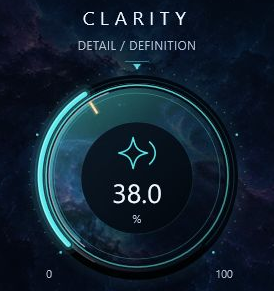
01 CLARITY
Bring detail
into focus.
Shape low-mid weight and presence for a more defined finish.
Inside the control
A focused way to adjust definition. Listen to the body of the mix as you bring detail forward.
 HEXTHE ENGINEER
PROJECTNEBULA / PRIVATE BETA BY INVITATION
Detail. Smoothness. A little more air.
A considered finishing pass for mixing engineers.
Have an invitation? Redeem your permanent complimentary license.
Redeem CodeFour focused controls.
Your ears make the final call.
Built for the last tonal decisions.
Useful wherever the mix needs refinement.
01 / LISTEN CLOSELY
Choose a mix. Hear the finish.
The same moment, before and after.
EXAMPLE 01 FULL MIX
Press Play to load the audio. Headphones recommended.
Settings used for this example
COMPARE THE FINISHListen for the balance of detail, smoothness and air. A and B are matched in integrated loudness, with their timing preserved.
LISTEN INSIDE TAMEDelta plays only the signal removed by Tame. It is intentionally much quieter, and is not the difference between the complete A and B renders. Keep your listening level steady.
The supplied Bypassed, Active and Delta renders are delivered as lossless 24-bit FLAC. The original WAV files are unchanged. Fixed playback trims: Bypassed −1.08 dB; Active −0.60 dB; Delta −0.60 dB. No extra EQ, compression, limiting or dynamic normalization was added.
A measures -19.02 LUFS integrated; B measures -19.01 LUFS. Delta retains its relative level; it has not been boosted to match the mix. Switching keeps the same timeline with a brief crossfade. The waveform is measured from the bypassed render.
This website’s prepared level matching is separate from the plugin. ProjectNebula’s Output control is manual; it does not provide automatic loudness matching.
EXAMPLE 02 PREMASTER
Press Play to load the audio. Headphones recommended.
Settings used for this example
COMPARE THE FINISHListen for the balance of detail, smoothness and air. A and B are matched in integrated loudness, with their timing preserved.
LISTEN INSIDE TAMEDelta plays only the signal removed by Tame. It is intentionally much quieter, and is not the difference between the complete A and B renders. Keep your listening level steady.
The three source renders share a start point but have different ending tails. This example uses their common first 26.32 seconds, with no time shifting. The originals retain their full tails.
The supplied Bypassed, Active and Delta renders are delivered as lossless 24-bit FLAC. The original WAV files are unchanged. Fixed playback trims: Bypassed −7.01 dB; Active −7.05 dB; Delta −7.05 dB. No extra EQ, compression, limiting or dynamic normalization was added.
A measures -19.01 LUFS integrated; B measures -19.01 LUFS. Delta retains its relative level; it has not been boosted to match the mix. Switching keeps the same timeline with a brief crossfade. The waveform is measured from the bypassed render.
This website’s prepared level matching is separate from the plugin. ProjectNebula’s Output control is manual; it does not provide automatic loudness matching.
EXAMPLE 03 PREMASTER
Press Play to load the audio. Headphones recommended.
Settings used for this example
COMPARE THE FINISHListen for the balance of detail, smoothness and air. A and B are matched in integrated loudness, with their timing preserved.
LISTEN INSIDE TAMEDelta plays only the signal removed by Tame. It is intentionally much quieter, and is not the difference between the complete A and B renders. Keep your listening level steady.
The three source renders share a start point but have different ending tails. This example uses their common first 21.54 seconds, with no time shifting. The originals retain their full tails.
The supplied Bypassed, Active and Delta renders are delivered as lossless 24-bit FLAC. The original WAV files are unchanged. Fixed playback trims: Bypassed −2.79 dB; Active −3.12 dB; Delta −3.12 dB. No extra EQ, compression, limiting or dynamic normalization was added.
A measures -19.01 LUFS integrated; B measures -19.01 LUFS. Delta retains its relative level; it has not been boosted to match the mix. Switching keeps the same timeline with a brief crossfade. The waveform is measured from the bypassed render.
This website’s prepared level matching is separate from the plugin. ProjectNebula’s Output control is manual; it does not provide automatic loudness matching.
02 / SHAPE THE FINISH
Simple decisions. Refined processing.
Set the amount that serves the material.
01 CLARITY
Shape low-mid weight and presence for a more defined finish.
A focused way to adjust definition. Listen to the body of the mix as you bring detail forward.
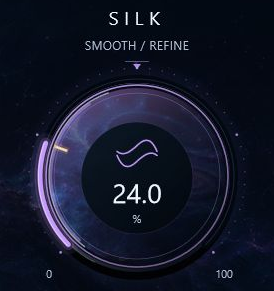
02 SILK
Refine upper-mid and treble harshness when the mix feels insistent.
Broader dynamic smoothing complements Tame’s narrower attention to prominent peaks.
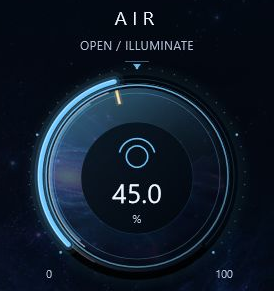
03 AIR
Lift existing high-frequency detail for a more open tonal balance.
Set openness by ear, checking cymbals, sibilance and the overall balance as you go.
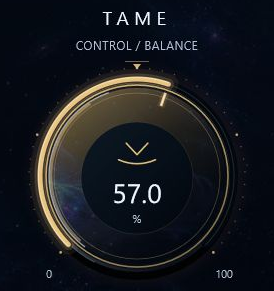
04 TAME
Apply adaptive, narrow attenuation to prominent resonant peaks.
Delta Listen auditions what Tame removes. It does not represent the changes made by all four controls.
03 / A PLACE IN YOUR PROCESS
The balance is right. The mix works.
Now give the remaining tonal details your attention.
Your balance. Your character. Your decisions.
Adjust. Match the output level. Compare.

Carry your intended balance into the next stage.
BEYOND THE PREMASTER
A final tonal pass on an established mix before dedicated mastering.
Refine the collective tone of instruments or voices with deliberate adjustments.
Bring detail forward or soften an insistent edge where the material calls for it.
04 / THE TECHNICAL DETAILS
An unsigned experimental Windows x64 VST3 beta.
Compatibility and long-session stability are not guaranteed.
64-bit Windows plugin
Home 25H2 x64
25.2.4.5242 · Exact beta build checked
BP010 · Authorized invitations only
Broader host qualification is in progress. No qualified macOS, AU or AAX release is available. Windows 10 and clean-machine checks are pending. Read compatibility details
FROM THE LISTENING SESSIONS
This space is reserved for approved feedback from private listening sessions.
The mix context. The finishing decision. The result.PRIVATE BETA · AVAILABLE BY INVITATION
Request a place in the first group of five ProjectNebula testers.
The owner reviews your request. If approved, your invitation arrives by email.
Use the invitation code with your verified email. Your license has no expiry and eligible private downloads live in My Plugins.
A request does not guarantee access. Public downloads and commercial sales remain closed; no public trial has been announced.
WINDOWS X64 · VST3 · WORKING PRODUCT NAME
A FEW FINAL DETAILS
Its flagship role is a final tonal pass on an established mix before mastering. It can also be explored on buses and selected tracks when their tonal balance calls for refinement. Placement depends on your existing chain.
Silk addresses broader upper-mid and treble harshness. Tame applies narrower adaptive attenuation to prominent peaks. Their separate controls let you decide how much of each approach the material needs.
Use Output to adjust the processed level, then switch Bypass and listen in context. Mix blends the processing; Delta Listen auditions only the signal removed by Tame. The current plugin does not provide automatic loudness matching.
Its purpose is focused tonal refinement. Your core mixing decisions come first, and dedicated mastering remains a separate stage. It is not a limiter or a complete mastering chain.
ProjectNebula is available to authorized invitation-only private-beta testers. Sign in with the email your invitation was sent to and redeem your code for a permanent complimentary license. Eligible installers appear in My Plugins. Public downloads are unavailable, commercial sales are closed, and a public trial has not been announced.